
An air gap is a workflow, not a sticker on the box.
Marketing likes to treat “air-gapped” as a product adjective: the device has no Wi‑Fi, therefore you are safe. That is incomplete. An air gap is a trust boundary you enforce every time value moves. Keys stay offline. Work still happens. The gap is the deliberate handoff between a networked workspace and a signing brain that never sits on your everyday network.
If you skip the handoff rituals — if you approve without reading, or you collapse the gap because it feels inconvenient — you do not have an air gap. You have a story.
What an air gap actually is
In custody terms, an air gap means the machine that holds private keys is not continuously online with the machine that browses the web, checks balances, or talks to exchanges.
You still need to spend. So you move unsigned data to the signer, authorize there, and bring a signature back. The online side can prepare and broadcast. It should never need the seed.
That split is the whole point:
- The desktop (or phone) is the workspace — history, fees, construction, convenience.
- The hardware is the authority — keys, confirmation, refusal.
An air gap without on-device confirmation is theater. Transport without a human reading amount and destination on the signer is just a fancy way to feed a compromised computer.
Why phones and “always plugged in” fail the idea
A phone authenticator or a soft wallet can be useful. It is not an air gap. The phone is on Wi‑Fi or cellular, receives notifications, syncs backups, runs other apps, and sits next to the same browser that can be phished. Continuity with the network is the product. That is the opposite of a gap.
USB-connected hardware wallets improve the story: keys can stay on the device. But if the computer can push signing requests over a live cable while malware reshapes what you think you are approving, the gap shrinks to “I hope the screen is honest and I always look.” Many people do look. Habit and fatigue still win more often than security blogs admit.
Air-gapped design accepts friction on purpose. You move a payload. You stop. You read the screen. You decide. That pause is the security feature.
The SeedMask loop
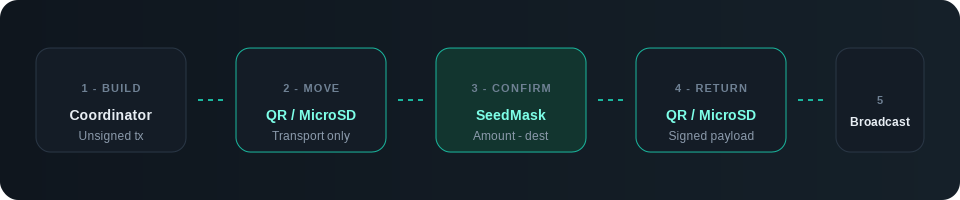
SeedMask is built around a simple loop. Coordinator is watch-only workspace. SeedMask is the signer.
1. Build
You construct an unsigned Bitcoin or Kaspa transaction in the Coordinator — destinations, amounts, fees — using public wallet state. The app should never ask for your seed. If it does, stop.
2. Move
You transfer that unsigned payload to SeedMask without putting the device on your everyday network. In practice that means QR codes for many flows, or a MicroSD card when the payload is larger or you prefer a physical handoff.
QR and MicroSD are transport. They are not trust. A QR can encode a malicious destination as easily as an honest one. A MicroSD can carry whatever the online machine wrote. The gap’s job is to get bytes across; the screen’s job is to make those bytes accountable to a human.
3. Confirm
On SeedMask you read what actually matters: amount and destination (and related details the firmware shows for that chain). This is the security boundary. Approve only what you intend. Reject anything that looks wrong — even if the desktop UI looked fine.
Compromised software can lie on a laptop screen. It cannot rewrite the device’s confirmation UI unless it has already broken the signer. That is why confirmation lives offline.
4. Return and broadcast
You move the signed transaction back to the Coordinator (again via QR or MicroSD). Broadcast when you choose. The device stays the authority. The desktop stays the workspace.
What screen confirmation is for
People underestimate confirmation because it feels like bureaucracy. It is the last place a wrong send can die cheaply.
- Amount — are you sending what you meant, including fees and change assumptions you care about?
- Destination — is this address / payment target yours or the recipient you verified out of band?
If you train yourself to tap through because “I already checked on the computer,” you donated the air gap back to whoever owns the computer.
Common failure modes
Air gaps fail in predictable ways:
Approving from habit. The desktop looked right; the device is “just the next step.” That is how silent destination swaps win.
Photographing seed words “to make QR easier later.” You did not invent a clever workflow. You put the cold path into a camera roll that syncs.
Treating MicroSD as magic. A dedicated card for wallet work reduces casual contamination. It does not make the contents trustworthy. Still read the screen.
Collapsing the gap for speed. Plugging the signer into a hot machine “just this once,” skipping offline transfer, or restoring seeds into everyday software ends the model you thought you bought.
Skipping practice. The first stressful send is a bad time to learn the ritual. Practice with amounts you can afford to get wrong.
How this fits SeedMask
SeedMask’s product boundary is deliberate: Bitcoin and Kaspa, watch-only Coordinator, device confirmation before anything of value leaves cold storage. The air gap is not a slogan on the Features page — it is the loop above, repeated until it is boring.
Boring is good. Custody that stays interesting usually means you are still improvising under pressure.
If you want the mental model in shorter form, start with Basic crypto. If you want the product steps, use the air-gapped send tutorial. This note is the why: transport moves bytes; the screen decides; the seed never needs to visit the network for the loop to work.